How to find a manga from a picture (step by step)
By Tahir Nazir Last updated
Crop the picture to one clean panel, removing borders, captions and app buttons. Search it with SauceNAO if it is a black-and-white page and Google Lens if it is a cover or colour art, then try IQDB and Yandex. No match? Try a different panel, then search by description, and confirm any title on AniList.
What makes a picture easy to search?
Reverse image search engines compare your picture with images they have already seen. They do best when your picture looks like the original page. Every extra layer, such as a speech bubble, a phone status bar, a filter or a watermark, makes it look less like the original.
The best search image is:
- one panel, not a whole page or a collage,
- the original art, not a mirrored, recoloured or stretched copy,
- free of app bars, captions, emoji and reposter handles,
- large enough to see faces and lines clearly.
You rarely get all four. That is fine. Fixing even one of them often turns a miss into a match.
Which engine should you use?
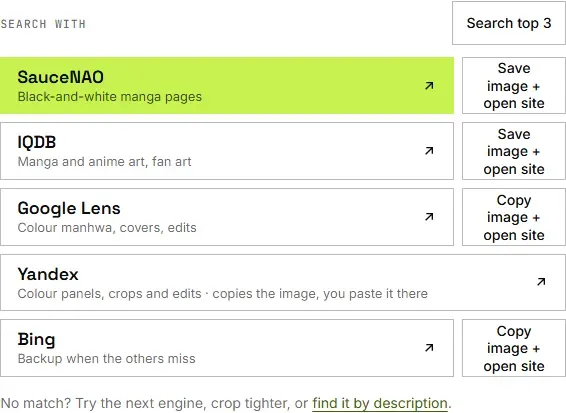
Pick the engine by the kind of picture, not by habit. Each one indexes different things. This is the order that works most often:
| Engine | Best for | Weak on |
|---|---|---|
| SauceNAO | Black-and-white manga pages and panels | Brand-new chapters, heavy edits |
| Google Lens | Colour pages, covers, webtoons, popular series | Single panels from lesser-known manga |
| Yandex | Reposted, filtered or edited images | Exact chapter numbers |
| IQDB | Colour illustrations and fan art | Manga chapter pages (it indexes art sites) |
| Bing | A backup when the others miss | Black-and-white panels |
First, what kind of picture do you have?
Thirty seconds of looking saves a lot of wrong searches, because each kind of picture has a different best engine.
- Black-and-white page with screentone dots, read right to left: almost always Japanese manga. Start with SauceNAO.
- Full colour, tall frame, lots of empty space between images: a Korean manhwa or Chinese manhua from a scrolling webtoon app. Start with Google Lens.
- Wide frame, soft shading, subtitles at the bottom: an anime screenshot, not a manga. An anime scene search such as AniTrace will do better.
- A cover, a poster or a photo of a book: Google Lens, which is good at printed covers and store listings.
- Polished colour illustration with an artist signature: probably fan art or a promo illustration. IQDB and SauceNAO index art sites, so try them.
Not sure about manga against manhwa? The guide to manga vs manhwa vs manhua shows the signs on a single page.
How to find a manga from a picture, step by step
- Save the best version you can find. If the picture came from a post, open it full size before you screenshot. A screenshot of a thumbnail loses detail the engines need.
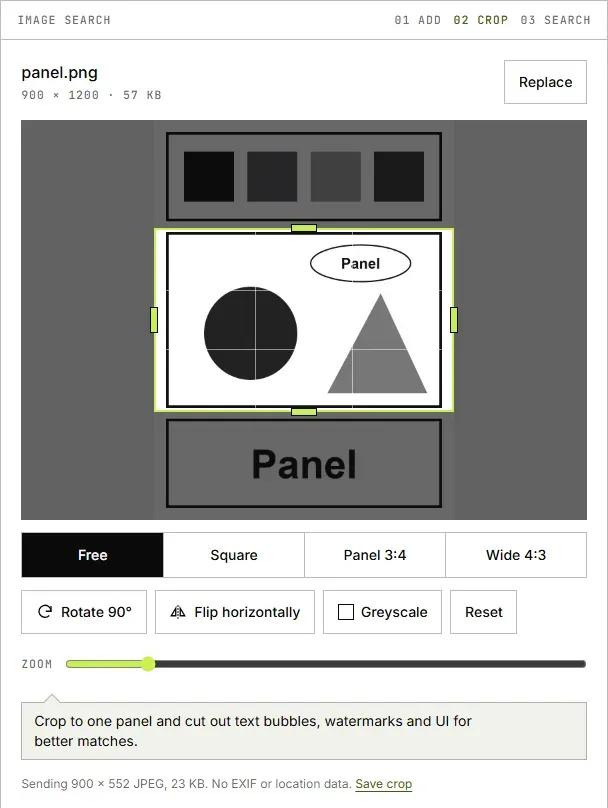
- Open it in a cropper. On MangaTrace, drop the file in, paste it, or pick it from your photos. It opens in your browser and nothing is uploaded yet.
- Crop to one panel. Choose the panel with the clearest face or the most distinctive art. Cut the panel border, the gutter and anything outside it.
- Cut the noise. Crop out speech bubbles, sound-effect text you can avoid, watermarks and scanlation credits. If the colours look strange, try the greyscale option. A recoloured manga page often matches better in black and white.
- Search the first engine. SauceNAO for black-and-white manga, Google Lens for anything in colour. MangaTrace puts the right one first based on the picture.
- Move down the list before you re-crop. If the first engine misses, try the second and third. Only then go back and crop differently, for example a different panel from the same page.
How to read the results
SauceNAO shows a similarity percentage, a title, and often the chapter or volume. High scores usually mean you have it. Low scores are often a lookalike. Open a couple of results and compare the art style, not just the characters.
Google Lens shows visual matches and pages that use the image: store listings, wikis, news posts. The title is usually in the page names. When we searched the One Piece and Solo Leveling covers, the first results were store listings and Wikipedia pages that named the series. Wondering whether Lens can find your manga at all? The Google Lens vs SauceNAO test shows where it works and where it does not.
Yandex and Bing work like Lens: a grid of similar images and the pages they appear on. They are worth a look when Lens only returns social posts, because they often surface different sites, including fan wikis that name the chapter.
Write the result down. Note the title and, if the engine shows it, the chapter number. A different-language title is still useful: AniList lists the known names for each series, so you can paste any of them in.
Confirm the title before you read. Search the name on AniList to see the official title, other names and the official places to read it. Engines also return unofficial reupload sites. In our One Piece test, one of Lens's visual matches was an unofficial reading site. Use those results to get the name, not to read.
Why it fails and what to try next
Most misses have one of a handful of causes. Match yours to a fix:
| What happened | Likely cause | Try next |
|---|---|---|
| No results anywhere | Too much around the art | Crop to one panel, cut bubbles and UI |
| Only low SauceNAO scores | Chapter not indexed yet, or a lookalike | Google Lens, then Yandex |
| Lens finds the same picture on social posts | The image is a repost, not the source | Open the posts and read captions and comments |
| Results show an anime | The picture is an anime frame | Search it with AniTrace |
| Results show fan art | The picture is fan art | Find the artist, then ask what series it is from |
| Engine says you hit a limit | Daily or short-term search limit | Use another engine, or see SauceNAO not working |
Two more causes are easy to miss. Edits on TikTok and Instagram are often mirrored, which can confuse engines. If the text reads backwards, flip the image in your photo editor before you search. And some edits are AI-coloured or redrawn, so they no longer look like any real page. For those, a black-and-white panel from the same scene, or the post's comments, will get you further than the edit itself.
When to stop searching by image
If three engines and two different crops find nothing, the picture is probably not in any index yet. That happens with very new chapters, small series and one-shots. MangaTrace has no manga database of its own, so it can't find what the engines have not seen.
Switch to what you remember. Our guide on how to find a manga you forgot the name of walks through it step by step. Find by description searches AniList by type, genre, tags and year. If that fails too, post the picture in the help threads of r/manga or r/manhwa, with the engines you already tried.
If an engine keeps missing, the SauceNAO alternatives compared shows which engine to try for each kind of picture.
Special cases
- Colour webtoon strip: cut one frame out of the strip and start with Google Lens. The manhwa finder is set up for this.
- Photo of a book or cover: Google Lens reads covers well. See find a manga by its cover.
- On your phone: the iPhone and Android guide covers screenshots, cropping and Lens without a computer.
- From a video edit: grab a clean frame first. The TikTok and Instagram guide shows how.
Questions people ask
How do I find a manga from a picture?
Crop the picture to one clean panel, removing borders, captions and app buttons. Search it with SauceNAO for black-and-white pages and Google Lens for covers or colour art, then try IQDB and Yandex. Read the results by similarity score and confirm the title on AniList before you start reading.
How can I find the source of an image?
Use a reverse image search. Upload the image or paste its link into Google Lens, Bing Visual Search, Yandex or TinEye for general pictures, or SauceNAO and IQDB for manga, anime art and illustrations. Cropping away borders, captions and app interface first gives every engine a cleaner match.
What manga chapter is this from?
A SauceNAO match on a manga page often shows the chapter or part number next to the title, because its index stores scans by chapter; in our test it even named a chapter for a SPY x FAMILY cover. Google Lens shows pages where the image was posted instead. Once you know the series, check the official release around that scene.
What does the similarity percentage mean on SauceNAO?
It is SauceNAO's estimate of how closely your image matches an image in its index. A high score usually means the right title; a low score is often a different series with a similar look. SauceNAO hides the lowest matches by default, so always confirm a weak hit's title on AniList before trusting it.